Audit CRM Data Quality with Claude Code: A GTM Engineer's Guide
CRM systems are supposed to be the source of truth.
In practice, they resemble a shared spreadsheet managed by committee, full of assumptions, outdated entries, and fields filled with TBD or John from marketing said maybe. Manual audits do not scale because the work repeats every quarter and nobody owns the output. Claude helps close that gap. You are not outsourcing judgment to an AI.
You are using it to automate the tedious parts of data profiling so you can focus on fixing root causes. This guide walks through how to structure a CRM data quality audit using Claude-generated code, what to validate, and how to operationalize findings without reinventing the wheel or trusting hallucinated syntax.
The goal is a repeatable process, not a one-time cleanup.
Why CRM Data Audits Fail Without Automation
Manual CRM audits fail because they depend on human repetition across objects, fields, and record sets that change weekly. The work is slow, inconsistent, and outdated by the time it finishes. Engineers inherit systems where field usage diverges from schema intent.
- Teams default to exporting CSVs and filtering in spreadsheets, which introduces version drift and access control gaps.
- Without automation, audits become point-in-time snapshots that do not scale across orgs with thousands of records.
- The repetition of writing the same validation logic across objects drains engineering time.
The real bottleneck is not data access. Claude can accelerate that work, but only if you know what to ask for. A vague prompt produces a vague script. A specific prompt with object names, field rules, and expected output produces something you can actually run.
The audit itself should be treated as a software problem, not a reporting task. You write checks, run them, and version the logic so the next audit starts from a known baseline. That mindset shift matters more than the tool you pick. Custom fields get repurposed over time.
Required fields stay blank. Timestamps land as free text because an integration mapped them wrong six months ago. Nobody notices until a report breaks and someone traces it back to a field that was never properly validated. Decision note: Treat the audit as code, not as a report.
Version the logic, schedule the runs, and make the output comparable across time.
Defining Data Quality for CRM Systems
Data quality has four working dimensions: completeness, consistency, timeliness, and structural integrity. A lead record missing an email might indicate a process gap in intake forms. Duplicate account names with mismatched billing addresses suggest integration failures.
- Free-text fields used for structured data, like Stage entered as maybe closing next week, break forecasting models.
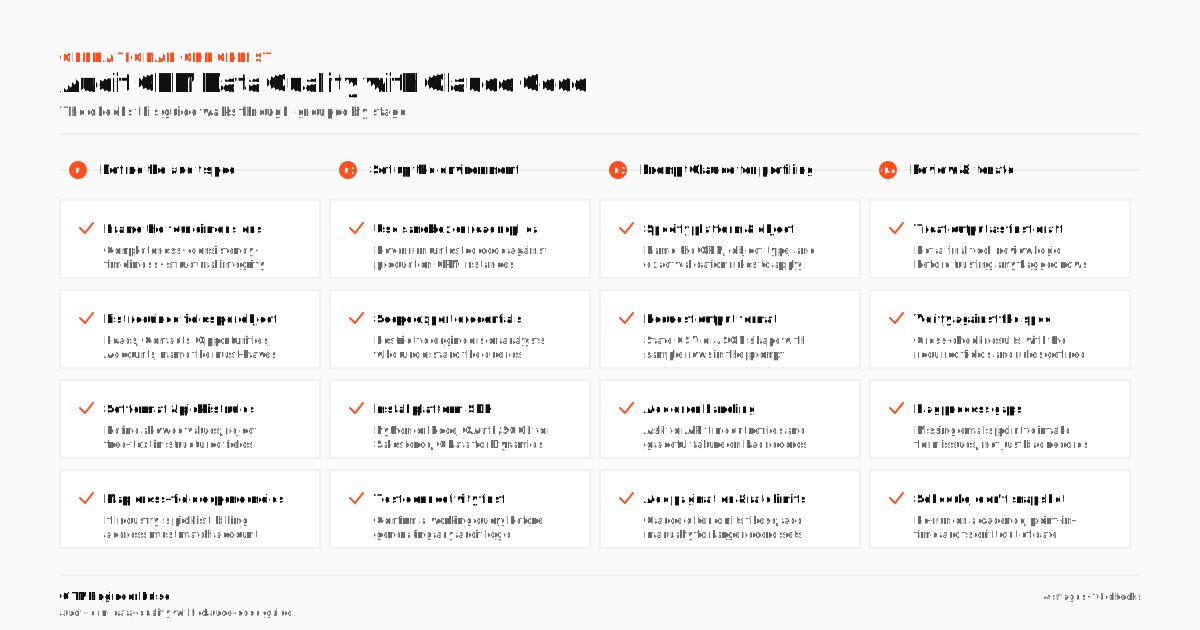
- Before writing code, define what good looks like per object.
- List required fields, format rules, and cross-field dependencies.
This becomes your audit spec, which Claude will translate into query logic. The spec should be explicit. If Industry must be a picklist value from a defined set, say so. If AnnualRevenue should be numeric and greater than zero, say so.
Claude will not infer your business rules. It will generate code that matches the constraints you describe. The more precise the spec, the less manual cleanup the generated script needs. Keep the spec versioned alongside the code so changes are traceable.
When a new field gets added to the CRM, the spec and the audit script should update together. That discipline prevents audit drift, where the script checks fields that no longer matter and misses the ones that do. The spec is a living document.
It should reflect how the business actually uses each field, not what the schema documentation says from three years ago. Talk to the people who own each object before locking the rules. Decision note: Write the spec before you write the prompt. Claude translates constraints, it does not invent them.
Setting Up the Audit Environment
Never run untested code against production CRM instances. Use a sandbox or read-only replica with representative data. Export access should be scoped to the objects under review: Leads, Contacts, Opportunities, and Accounts.
- Restrict credentials to engineers or analysts who understand the query structure.
- HubSpot relies on API keys and object endpoints.
- Microsoft Dynamics exposes a Web API with OData queries.
Authentication methods vary by platform. Salesforce uses OAuth and SOQL. Set up a local environment with Python or Node, install the relevant SDK, and test connectivity before generating any audit logic. This setup phase is where most teams cut corners.
A broken query in production can trigger API rate limits, consume expensive API credits, or lock users out of critical pages. Run a simple count query first. Confirm the connection works and the returned record count matches expectations. Then layer in the audit logic.
If you are using the simple-salesforce Python library, verify that your session token refreshes correctly on long runs. For HubSpot, check rate limit headers in the response so you can throttle requests.
The environment setup is boring work, but it is the difference between a script that runs once and one you can schedule repeatedly without babysitting. Document the setup steps so another engineer can reproduce the environment without guessing. Decision note: Test connectivity with a count query before running any audit logic.
Confirm the record count matches expectations before proceeding.
Prompting Claude for Data Profiling Code
Generic prompts like write code to check CRM data quality return generic, unusable results. Instead, specify the CRM platform, object type, and validation rules. For example: Generate a Python script using simple-salesforce to query Account records, count non-null values for Industry, Website, and AnnualRevenue, and flag records where Name contains Test or Dummy.
- Include the sample output format, CSV or JSON, and request error handling for API timeouts.
- Claude will often omit pagination and rate limit handling.
- Treat its output as a first draft, not a final tool.
You will need to add pagination logic manually, especially for orgs with large record sets per object. Ask Claude to include comments explaining each query block. That makes peer review faster and helps you catch hallucinated field names before runtime.
If Claude references a field that does not exist in your org, the script will fail on execution. Catch it early. A useful pattern is to ask Claude for the SOQL or API query string first, validate it against your schema, then ask for the surrounding Python wrapper.
Splitting the prompt into query generation and script generation reduces the chance of compounded errors. It also makes debugging easier when something breaks, because you can isolate whether the query itself is wrong or the wrapper logic is flawed.
Decision note: Ask for the query string first, validate it against your schema, then ask for the wrapper. Splitting the prompt reduces compounded errors.
Validating Field Completeness and Patterns
Start with required fields. Use SOQL or REST queries to count nulls across core fields per object. But null counts alone are misleading.
- A field can be technically populated and still carry no useful information.
- Look for false positives: fields marked complete but holding placeholder values like N/A, unknown, or 123.
- Use regex patterns to detect these in free-text fields.
Close dates in the past on open opportunities indicate stale records. For dates, check for impossible values. Created dates that postdate last modified timestamps suggest integration bugs or timezone misconfigurations. Claude can generate pattern-matching logic, but you must define the patterns.
A script that flags Q4 2023 in a date field is more useful than one that just reports null counts. Write the regex rules into your audit spec so Claude has something concrete to translate. Test the regex against a small sample before running it on the full dataset.
A pattern that matches too broadly will flag legitimate records. A pattern that matches too narrowly will miss real problems. The goal is precision, not coverage theater. When you find a new placeholder pattern in the data, add it to the spec and regenerate the matching logic.
The audit script should evolve as you discover new ways users invent to avoid filling fields correctly. Decision note: Null counts are a starting point, not a conclusion. Pattern matching catches the placeholders that null checks miss.
Detecting Structural Inconsistencies
CRM data degrades at the edges. Integrations inject malformed payloads. Users paste data from unstructured sources.
- The result is fields that technically accept values but fail every downstream assumption.
- Look for field type mismatches: phone numbers stored as text with inconsistent formatting, or multi-select picklists converted to comma-separated strings in exports.
- Use code to group values by pattern and count frequency.
A picklist field with hundreds of unique spellings of Active is a training and governance failure, not just a data problem. Claude can generate frequency distribution scripts that count unique values per field and sort by occurrence. You need to interpret the outliers. The code finds the noise.
You decide what is signal. For example, if a Country field contains many distinct values but several are misspellings of the same country, the fix is a picklist constraint, not a data cleanup. Structural checks should also cover relationship integrity. Confirm that every Opportunity references a valid Account ID.
Confirm that every Contact has a parent Account. Orphaned records break reporting and routing. Claude can generate join-check scripts, but you need to specify the relationship fields and expected cardinality. The output should list orphaned record IDs so operations can investigate, not just a count.
Decision note: Frequency distributions reveal governance gaps. If the same value appears in dozens of spellings, the fix is a constraint, not a cleanup.
Reporting and Prioritizing Findings
Raw query output is not actionable. Transform results into a summary report: percentage of records meeting criteria, top anomalies, and object-level risk scores. Avoid dashboards that just repeat the data without context or ranking.
- Fields with low completeness that feed critical reports should rank higher than fields used only in optional views.
- Inconsistencies in high-impact objects like Opportunities affect forecasting and revenue tracking, so they deserve immediate attention.
- Share findings with sales ops and RevOps teams in context.
Focus on what needs correction. Instead of reporting 340 leads lack company domain data, frame it as routing accuracy is degraded because 340 recent leads lack company domain data, affecting assignment rules. That framing connects the data problem to a business outcome. Let the code do the counting.
You handle the conversations. Prioritize fixes by impact: fields that break automation first, fields that distort reporting second, fields that affect hygiene third. Claude can help generate the summary logic, but the prioritization framework is yours. If you try to fix everything at once, you will fix nothing.
Pick the top three breaks, assign owners, and set a deadline. Then rerun the audit and check whether the fixes held. Decision note: Rank fixes by business impact, not by record count. A broken automation field costs more than a messy optional field.
Building Recurring Audit Workflows
One-off audits do not fix systemic issues. Schedule the same checks monthly or quarterly using cron jobs or workflow tools like Apache Airflow. Update the Claude-generated scripts to include version tracking and change detection.
- Flag when new placeholder values appear or when field usage drops unexpectedly.
- Automate alerts for critical breaks, like a sudden spike in null values after an integration update.
- If you cannot prevent bad data, at least make sure you see it fast.
The objective is detectability, not perfection. A recurring audit catches regressions before they compound. An integration that starts dropping a field on a significant percentage of new records will distort reporting within a week if nobody notices. A scheduled audit catches it on the next run.
Store audit results in a simple table or log file so you can compare runs over time. Trend lines tell you whether data quality is improving or degrading. Claude can help scaffold the reporting queries, but the scheduling and alerting infrastructure is standard engineering work. Keep the audit scripts in version control.
Tag each release. When a script changes, document what changed and why. That trail matters when someone asks why a field that passed last quarter now fails. Decision note: Schedule the audit, store the results, and track the trend.
Detectability beats perfection because it gives you time to fix regressions before they compound.
Frequently Asked Questions
Can Claude write production-ready CRM audit scripts?
Not without review. Claude generates functional templates, but often omits error handling, pagination, and authentication refresh logic. Always test its output in a non-production environment and add safeguards before deployment.
Which CRM platforms work best with Claude-generated code?
Salesforce, HubSpot, and Microsoft Dynamics are well-supported due to public APIs and SDKs. The quality of generated code depends more on the clarity of your prompt than the platform, but standardized APIs reduce friction.
How do I prevent over-reliance on AI for data validation?
Use Claude for code generation, not logic design. Define validation rules yourself. Treat AI output as a starting point that requires testing, peer review, and alignment with data governance policies.
Should audit scripts run on full datasets or samples?
Start with samples to validate logic, then scale to full datasets with pagination. Full scans are more accurate but can hit API rate limits. Balance completeness with system impact.
What coding skill is required to use this approach?
You need enough scripting experience to read, modify, and test generated code. That means understanding API responses, loops, and conditionals. Without that foundation, you cannot reliably catch errors in Claude output before running it against live data.

Rome Thorndike
Rome Thorndike is the CEO & Founder of Provyx, which provides GTM intelligence and data validation for healthcare companies, including EngagedMD and BTL Industries. He helped establish HubSpot reporting at Pacdora, owned pipeline reporting at Datajoy, and led revenue at Firmograph.
Connect on LinkedIn