gtm engineering tools: the 2026 stack
A practitioner-sourced guide to the GTM engineering stack, covering data, enrichment, CRM, automation, AI coding, agency spend, and terminal workflows.
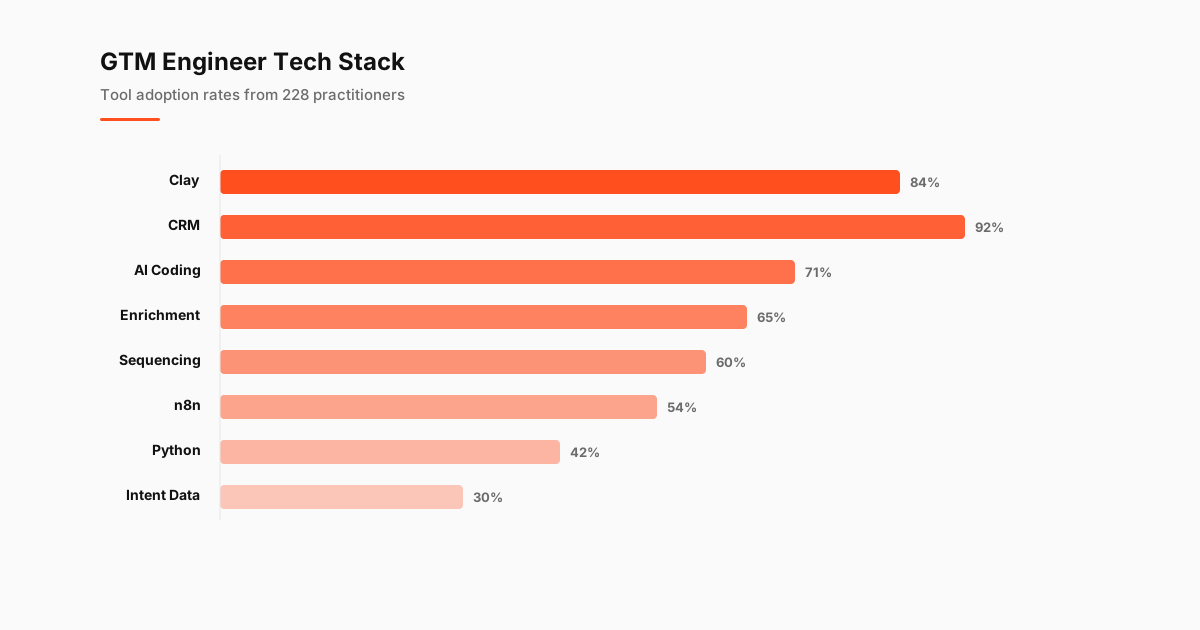
The gtm engineering tools stack has a clear center of gravity: Clay for enrichment and research, a CRM for customer context, n8n for automation, and AI coding tools for the work that needs code. The data comes from 228 GTM Engineers surveyed in the State of GTM Engineering Report 2026. Survey benchmark
A good stack turns messy company data, web research, and sales intent into work a team can act on. The tools matter. The connections between them matter more.
GTM Engineers use a wide set of products across prospecting, data, automation, CRM administration, reporting, and coding. GTME Pulse tracks 27 tool categories in total. Survey benchmark That sounds like a lot until you look at the job: GTM work touches every system where a company learns who to sell to, decides whom to contact, and records what happened.
The stack has standardized faster than the role itself. Clay is the common research layer. CRMs remain the system of record. n8n handles workflow automation. Cursor and Claude Code have put software-building habits in the hands of operators who used to wait on engineering.
The Standard GTM Engineering Stack, Layer by Layer
A GTM stack works best when each layer has a job. Data enters at the top. Enrichment makes it usable. The CRM holds the commercial record. Automation moves information between systems. AI coding tools handle the custom work that off-the-shelf tools leave behind.
The data layer starts with a company or contact list, often pulled from internal records, prospecting sources, product signals, or public web data. Raw records are cheap. Useful records take work. A GTM Engineer needs enough context to decide whether an account belongs in a motion and enough reliable fields to route it correctly.
Clay sits in the enrichment and research layer. Clay leads adoption at 84% of practitioners, rising to 96% among agencies. Survey benchmark That adoption makes sense because it handles the unglamorous middle of the job: joining data, researching companies, finding people, generating context, and producing a usable output for a campaign or sales team.
People complain about tools they can’t leave. Clay gets plenty of complaints, usually around cost, workflow complexity, or the temptation to build another elaborate table. It also has the adoption pattern of a tool teams keep after the honeymoon period. Once an organization has built its account research, enrichment logic, and campaign inputs around it, replacing it becomes an expensive distraction.
The CRM is the system of record. A CRM is in use by 92% of GTM Engineering practitioners. Survey benchmark That rate reflects a basic truth about the role: prospecting data only becomes commercially useful when it lands in the place where sellers, marketers, customer teams, and leadership can see the same account history.
The CRM layer should hold clean ownership, lifecycle status, opportunity context, and the fields that affect routing or reporting. It should not become a junk drawer for every enrichment field a workflow can produce. A bloated record slows down the people who need it, and it makes automation harder to reason about later.
Workflow automation sits between the systems. n8n sits at 54% adoption for workflow automation. Survey benchmark It earns a place because GTM work rarely stays in one application. A list may need enrichment, filtering, routing, validation, CRM updates, alerts, and a final handoff to an outbound sequence.
The right automation layer reduces the repeated work without obscuring the logic. Someone should be able to answer a simple question: where did this field come from, what changed it, and what happens next? If nobody can answer those questions, the stack has become a literal money pit.
AI coding tools now sit beside the familiar no-code products. AI coding tools have reached 71% adoption among GTM Engineers. Survey benchmark That number captures a change in how the role operates. GTM Engineers can write a script, inspect an API response, transform a CSV, or build a small internal interface without turning each request into a ticket.
The stack works when each tool has a narrow role. Clay researches. The CRM records. n8n moves work. AI coding tools cover the gaps. Teams that keep those boundaries clear spend less time debugging their own machinery.
Core Stack Tools Side by Side
| Stack layer | Core tool category | Adoption rate | Role in the stack |
|---|---|---|---|
| Enrichment and research | Clay | 84% | Researches accounts, enriches records, and prepares campaign inputs |
| Customer record | CRM | 92% | Holds ownership, commercial history, and lifecycle data |
| Workflow automation | n8n | 54% | Moves data and actions between systems |
| Custom building | AI coding tools | 71% | Supports scripts, API work, internal tools, and data transformations |
| Broader ecosystem | Tool categories tracked | 27 | Covers the surrounding GTM workflow |
Clay has the strongest claim to being the shared workspace for modern enrichment. The Clay adoption data shows why it has become the tool most likely to appear in a GTM Engineer’s daily workflow. Its value comes from combining research and execution in the same place. A useful table can become a campaign input, an account scoring system, or a trigger-based workflow.
The CRM has a different job. It needs consistency more than novelty. A GTM Engineer should treat it like critical infrastructure: define field ownership, document routing rules, and remove data that has no downstream use. The stack falls apart when every adjacent tool writes freely into the CRM.
n8n is a strong fit when the workflow needs branching logic, custom API calls, or careful error handling. It also creates responsibility. Automations that touch prospect status, record ownership, or outbound eligibility need observability. A workflow that quietly fails can do more damage than one that never launched.
AI coding tools are where the stack gets personal. One engineer may use them to clean a list, another to build an internal prospecting utility, and another to investigate why an automation changed records. The AI coding tools data gives the category its own benchmark because adoption no longer looks like a niche behavior.
Agency Stacks vs In-House Stacks
Agencies tend to build heavier stacks because they operate across clients, campaigns, data models, and delivery deadlines. They need repeatability without forcing every client into the same motion. That creates more demand for flexible enrichment, automation, documentation, and quality control.
Clay leads adoption at 84% of practitioners, rising to 96% among agencies. Survey benchmark Agencies have a strong reason to make it central: research and enrichment are deliverables, not background tasks. A team running many client programs needs a way to produce tailored account context at speed without handing every project to a separate research function.
Tool spending follows the same pattern. 55% of agencies spend $5K-$25K annually on tools. Survey benchmark The spend reflects the economics of delivery. An agency can spread a tool’s cost across multiple client engagements, while an in-house team has to justify the same expense against one operating model.
In-house teams usually have a narrower mandate and more direct access to internal data. Their stack can be smaller, provided the foundation is clean. A CRM with reliable fields, a research layer that sales trusts, and a few well-maintained automations will beat a sprawling collection of overlapping subscriptions.
Agencies win when they can apply a proven operating system without treating every client like a copy-paste exercise. The danger is building a tower of automations that only one person understands. Client work changes quickly. A stack that needs an archaeological dig every time a campaign shifts will eat its own margin.
In-house teams lose ground when they treat GTM Engineering as a tool-buying function. The better question is where the current process breaks: data quality, routing, research time, reporting, or execution capacity. Buy and build around that constraint. Everything else can wait.
The annual tool spend data is useful here because it separates the cost conversation from the logo conversation. A cheap tool that creates manual cleanup is not cheap. An expensive tool that eliminates a recurring bottleneck may earn its place quickly.
Running GTM From the Terminal
Terminal-first GTM work is becoming more common because the work itself has become more technical. A browser is fine for research and visual review. It gets tedious when you need to inspect a file, transform a dataset, call an API, compare outputs, or rerun a process with one change.
AI coding tools have reached 71% adoption among GTM Engineers. Survey benchmark Cursor and Claude Code fit this shift because they lower the cost of turning an operational question into working code. The useful pattern is simple: start with a narrow task, make the result inspectable, and keep the workflow small enough that you can debug it later.
A terminal workflow might pull a prospect list, validate fields, enrich a subset through an API, flag missing information, and write a clean output for review. The terminal does not replace Clay or the CRM. It gives engineers a place to handle tasks that need more control than a visual workflow provides.
Claude Code is especially useful when you already know the goal but need help navigating the implementation. It can help inspect a repository, write a transformation, explain an error, or create a lightweight utility around a recurring task. The quality of the outcome still depends on the inputs. A poorly defined enrichment rule remains poorly defined after it gets wrapped in code.
Cursor fits teams that want the same assistance inside an editor. It is useful for work that grows beyond a one-off command: API connectors, internal tools, data quality checks, or reusable scripts. GTM Engineers who can move between a spreadsheet, Clay, an automation platform, and a code editor have more ways to solve the job in front of them.
The terminal also creates a discipline that browser-heavy work can hide. Inputs can be versioned. Transformations can be reviewed. Outputs can be tested against a sample before touching production records. That matters when the workflow affects customer data or outbound activity.
Start with repeatable pain. A weekly list cleanup, a recurring enrichment check, a routing audit, or a campaign QA pass can be a good candidate. Avoid building a private platform around a task that happens once. The point is to remove friction from real operating work, not to collect another impressive technical artifact.
How to Choose What Belongs in Your Stack
Choose tools by the job that needs to happen repeatedly. An enrichment layer earns its place when it makes targeting or personalization better. An automation layer earns its place when it removes handoffs and preserves data quality. A coding tool earns its place when the task needs control, reuse, or integration depth.
Start with the CRM. If ownership, lifecycle stages, and required fields are unclear, every other layer will magnify the confusion. Then decide how data enters the system, what research is required before action, and where automation should make a decision versus simply move information.
Clay is the best first addition for teams whose problem is research and enrichment. n8n becomes more useful when a workflow crosses several applications or needs custom logic. AI coding tools become more useful when you have a repeated task that no existing connector handles cleanly.
The tech stack benchmark helps put individual choices into a broader practitioner view. Adoption data should inform the decision, not make it for you. A popular tool can still be a poor fit for a team with a different motion, data model, or level of technical ownership.
Keep the stack legible. Every tool should have an owner, a purpose, and a clear point where its output becomes someone else’s input. When a tool has none of those, it is probably software shelfware with a prettier logo.
The stack is getting more capable. The harder question is whether teams will use that capability to build cleaner systems or more complicated ones.
Tool Deep-Dives
Tech Stack Benchmark
Full adoption rates, spend data, and agency vs in-house splits across every tool category
Clay Deep-Dive
84% adoption, 96% among agencies. Most loved and most frustrating tool in the stack
CRM Adoption
92% use a CRM. Salesforce vs HubSpot split by company size, integration patterns
AI Coding Tools
71% use AI coding tools. Cursor and Claude Code lead. The $45K coding premium connection
n8n Adoption
54% adoption, replacing Zapier and Make. Agency vs in-house usage gap
Tool Frustrations
What GTM Engineers hate most. Integration issues, UX problems, and why Clay is both loved and despised
Most Exciting Tools
Claude (39 mentions), Cursor (11), n8n (8). What GTM Engineers are most excited about in 2026
Unify Analysis
8.8% adoption despite heavy marketing. Honest look at where Unify fits in the GTM stack
Annual Tool Spend
55% of agencies spend $5-25K on tools. US vs non-US spending patterns and where the money goes
ZoomInfo vs Apollo
Head-to-head for the 65% of GTM Engineers using data enrichment. Pricing, data quality, workflow fit
Tool Wishlist
All-in-one outbound is the #1 request. What tools GTM Engineers wish existed and what that signals
Zapier vs n8n
n8n at 54% adoption is replacing Zapier. Per-task vs self-hosted pricing and agency vs enterprise preferences
HubSpot vs Salesforce
92% CRM adoption split by company size. API quality, automation depth, and which skills to learn
Python for GTMEs
The $45K coding premium, bimodal adoption, AI coding acceleration, and an 8-week learning path
SQL for GTMEs
SQL in ~25% of job postings. Enterprise demand, SOQL, BigQuery use cases, and when spreadsheets aren't enough
JavaScript vs Python
JavaScript in ~15% of job postings. Clay code steps, n8n nodes, browser automation, and when to learn which
Coming Soon
Clearbit Prospector API
Data analysis in progress. Check back for the full report.
Apollo Adoption
Data analysis in progress. Check back for the full report.
Instantly Adoption
Data analysis in progress. Check back for the full report.
Smartlead Adoption
Data analysis in progress. Check back for the full report.
Make vs n8n
Data analysis in progress. Check back for the full report.
LinkedIn Sales Navigator
Data analysis in progress. Check back for the full report.
6sense Adoption
Data analysis in progress. Check back for the full report.
ZoomInfo Adoption
Data analysis in progress. Check back for the full report.
Outreach Adoption
Data analysis in progress. Check back for the full report.
Salesloft Adoption
Data analysis in progress. Check back for the full report.
PhantomBuster Adoption
Data analysis in progress. Check back for the full report.
Lemlist Adoption
Data analysis in progress. Check back for the full report.
Claude Code for GTM Engineers: Review 2026
Data analysis in progress. Check back for the full report.
OpenAI Codex for GTM Engineers: Review 2026
Data analysis in progress. Check back for the full report.
Make Review 2026: Visual GTM Automation
Data analysis in progress. Check back for the full report.
n8n Review 2026: Self-Hosted Automation
Data analysis in progress. Check back for the full report.
Zapier Review 2026: 6,000+ Integrations
Data analysis in progress. Check back for the full report.
6sense Review 2026: Enterprise Intent Data
Data analysis in progress. Check back for the full report.
Bombora Review 2026: Publisher Intent Data
Data analysis in progress. Check back for the full report.
Hightouch Review 2026: Reverse ETL for GTM
Data analysis in progress. Check back for the full report.
Census Review 2026: Reverse ETL Done Right
Data analysis in progress. Check back for the full report.
Common Room Review 2026: Community Signals
Data analysis in progress. Check back for the full report.
Pocus Review 2026: Product-Led Sales Platform
Data analysis in progress. Check back for the full report.
Default Review 2026: Inbound Conversion Platform
Data analysis in progress. Check back for the full report.
Segment Review 2026: CDP for GTM Stacks
Data analysis in progress. Check back for the full report.
PostHog Review 2026: Open-Source Analytics
Data analysis in progress. Check back for the full report.
Sales Navigator Review 2026: Worth It?
Data analysis in progress. Check back for the full report.
PhantomBuster Review 2026: LinkedIn Risks
Data analysis in progress. Check back for the full report.
Tool Reviews (30)
In-depth, vendor-neutral reviews of every major tool in the GTM Engineer stack. Honest criticism, real pricing, and specific use cases for practitioners. Organized by category.
AI & LLM Tools
Claude Code Review
AI & LLM Tools: honest criticism, pricing breakdown, and GTM Engineer use cases.
OpenAI Codex Review
AI & LLM Tools: honest criticism, pricing breakdown, and GTM Engineer use cases.
Data Enrichment & Orchestration
Clay Review
Data Enrichment & Orchestration: honest criticism, pricing breakdown, and GTM Engineer use cases.
Apollo.io Review
Data Enrichment & Orchestration: honest criticism, pricing breakdown, and GTM Engineer use cases.
ZoomInfo Review
Data Enrichment & Orchestration: honest criticism, pricing breakdown, and GTM Engineer use cases.
Clearbit Review
Data Enrichment & Orchestration: honest criticism, pricing breakdown, and GTM Engineer use cases.
FullEnrich Review
Data Enrichment & Orchestration: honest criticism, pricing breakdown, and GTM Engineer use cases.
Lusha Review
Data Enrichment & Orchestration: honest criticism, pricing breakdown, and GTM Engineer use cases.
Cognism Review
Data Enrichment & Orchestration: honest criticism, pricing breakdown, and GTM Engineer use cases.
LeadIQ Review
Data Enrichment & Orchestration: honest criticism, pricing breakdown, and GTM Engineer use cases.
Persana AI Review
Data Enrichment & Orchestration: honest criticism, pricing breakdown, and GTM Engineer use cases.
Outbound Sequencing
Instantly Review
Outbound Sequencing: honest criticism, pricing breakdown, and GTM Engineer use cases.
Smartlead Review
Outbound Sequencing: honest criticism, pricing breakdown, and GTM Engineer use cases.
Outreach Review
Outbound Sequencing: honest criticism, pricing breakdown, and GTM Engineer use cases.
Salesloft Review
Outbound Sequencing: honest criticism, pricing breakdown, and GTM Engineer use cases.
Lemlist Review
Outbound Sequencing: honest criticism, pricing breakdown, and GTM Engineer use cases.
HeyReach Review
Outbound Sequencing: honest criticism, pricing breakdown, and GTM Engineer use cases.
Woodpecker Review
Outbound Sequencing: honest criticism, pricing breakdown, and GTM Engineer use cases.
CRM
HubSpot CRM Review
CRM: honest criticism, pricing breakdown, and GTM Engineer use cases.
Salesforce Review
CRM: honest criticism, pricing breakdown, and GTM Engineer use cases.
Pipedrive Review
CRM: honest criticism, pricing breakdown, and GTM Engineer use cases.
Close CRM Review
CRM: honest criticism, pricing breakdown, and GTM Engineer use cases.
Attio Review
CRM: honest criticism, pricing breakdown, and GTM Engineer use cases.
Workflow Automation
Make Review
Workflow Automation: honest criticism, pricing breakdown, and GTM Engineer use cases.
n8n Review
Workflow Automation: honest criticism, pricing breakdown, and GTM Engineer use cases.
Zapier Review
Workflow Automation: honest criticism, pricing breakdown, and GTM Engineer use cases.
Intent Data
6sense Review
Intent Data: honest criticism, pricing breakdown, and GTM Engineer use cases.
Bombora Review
Intent Data: honest criticism, pricing breakdown, and GTM Engineer use cases.
Hightouch Review
Intent Data: honest criticism, pricing breakdown, and GTM Engineer use cases.
Census Review
Intent Data: honest criticism, pricing breakdown, and GTM Engineer use cases.
Common Room Review
Intent Data: honest criticism, pricing breakdown, and GTM Engineer use cases.
Pocus Review
Intent Data: honest criticism, pricing breakdown, and GTM Engineer use cases.
Default Review
Intent Data: honest criticism, pricing breakdown, and GTM Engineer use cases.
Analytics
Segment Review
Analytics: honest criticism, pricing breakdown, and GTM Engineer use cases.
PostHog Review
Analytics: honest criticism, pricing breakdown, and GTM Engineer use cases.
LinkedIn & Social
Source: State of GTM Engineering Report 2026 (n=228). Salary data combines survey responses from 228 GTM Engineers across 32 countries with analysis of 3,342 job postings.

Rome Thorndike
Rome Thorndike is the CEO & Founder of Provyx, which provides GTM intelligence and data validation for healthcare companies, including EngagedMD and BTL Industries. He helped establish HubSpot reporting at Pacdora, owned pipeline reporting at Datajoy, and led revenue at Firmograph.
Connect on LinkedIn